
 Stowback
Stow your windows and tab groups. Get them back exactly as they were.
Save a window with one click and bring it back with its tabs in order, its pinned tabs and its tab groups with their names and colours. Stow the tabs you are done with for now: they are saved and closed, which frees their memory. Give each project a workspace that saves itself. If a tab or a window is closed by mistake or the browser crashes, it is in the timeline. No account, and nothing leaves your device.
Coming soon to the Chrome Web StoreFree plan with unlimited snapshots. No account. Everything stays on your device.
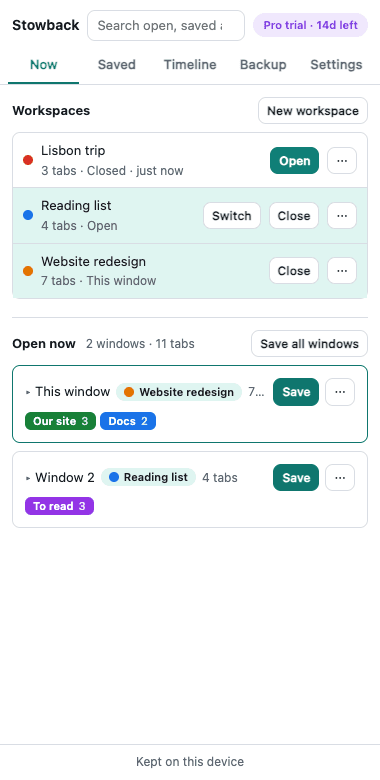
Exactly as it was
Tabs in order, pinned tabs, tab groups with name, colour and folded state, the tab in front, and the window’s place on the screen. Large sets open unloaded, so fifty tabs do not load at once.
A window per project
A workspace follows its window and saves itself as you work. Close it when you are done and open it later as you left it. Switch with one click, or by typing part of its name in the address bar. Right-click a page or a link to send it to the project it belongs to.
Nothing is lost
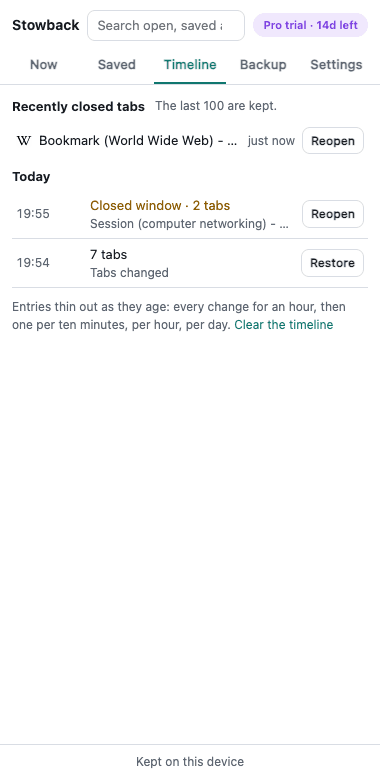
What is open is noted as you work, and the last 100 tabs you close are kept. A tab or a window closed by mistake, or everything that was open before a crash, is offered back. Deleting, stowing and replacing can be undone.
What do you want to do?
- Save and restore Chrome tab groups with their names and coloursFree
- Close tabs without losing them, to free memoryFree
- Get your tabs back after Chrome crashes or a window is closedFree
- Switch between projects in Chrome with workspacesFree
- Open fifty saved tabs without loading fifty pagesFree
- Move your saved tabs from another tab manager or your bookmarksFree
- Back up your saved tabs and tab groups to a filePro
Pro, for people with more than three projects
- Unlimited workspaces (the free plan follows 3)
- A year of timeline, and a comparison of what was opened and closed between two points (the free plan shows 7 days)
- A backup file written to your Downloads folder every day
- Workspace rules: new tabs from a site you name open in the workspace and tab group they belong to
- Templates: start a new workspace from a saved set of tabs and groups
- Merge snapshots, split one by window, group or site, and remove tabs saved twice
- One license key for 5 browsers or profiles
Pricing
Free
$0
- Unlimited snapshots of windows, tabs and tab groups
- Stow tabs to free memory, and reopen the last 100 tabs you closed
- 3 workspaces that save themselves, and 7 days of timeline
- Search, notes, tags, import, export and backup files
Every install starts with 14 days of Pro, no card needed. 14-day refund on every purchase. Prices are in US dollars, and in rupees for buyers in India. The checkout page says whether a plan renews by itself before you pay.
Questions
- Where does my data go?
- Nowhere. What you save is kept in your browser on your device and is never sent to TheSocialForks. The only server Stowback talks to checks license keys, and only for people who activated one. The extension cannot read or change the pages you visit: it sees which tabs are open, their titles and their addresses.
- What comes back, and what does not?
- Tabs in their order, pinned tabs, tab groups with their name, colour and folded state, the tab that was in front and the place of the window. What you had typed into a page, where you had scrolled to, the back button’s history and sign-ins that have ended do not come back: no extension can save those.
- How do I free memory without losing tabs?
- Stow them. Alt+Shift+X saves the tab you are on and closes it. Right-click the Stowback button to stow the other tabs of the window, or the whole window. They wait in Saved until you open them again. A stow never closes a pinned tab or a site on your never-save list.
- Chrome already saves tab groups. Why would I need this?
- Chrome keeps a tab group, and a group you delete is deleted on every device. Stowback saves whole windows, with the tabs that are in no group and the pinned tabs, keeps earlier states so a mistake can be taken back, and writes a file you can keep or move to another profile or computer.
- What happens to my workspaces when the trial ends?
- Nothing is deleted. Three workspaces keep saving themselves. The others stay as they are: you can still open them, export them, or choose which three should follow their window.
- What if I remove the extension or change computer?
- Everything is kept inside the browser, so removing the extension removes it. Make a backup file first (the Backup tab does it in one click, and reminds you); on the new browser, import that file.
- How do I cancel, or get a refund?
- Cancel a subscription yourself on the manage page. For a refund, write to support@thesocialforks.com within 14 days of buying. See cancellation and refunds.
- Which browsers?
- Google Chrome 128 or later.
Stowback is made by TheSocialForks. Not affiliated with Google or the maker of any other tab tool. Support: support@thesocialforks.com.