
 Pluckdown
Turn any page, PDF, transcript or thread into clean, safe context for your AI.
One keypress turns the page you are on into clean Markdown with its source and date, ready for ChatGPT, Claude, Gemini, a local model or a coding agent. It works on the pages AI tools cannot open themselves: behind your login, on your intranet, on localhost.
Coming soon to the Chrome Web StoreFree plan with unlimited grabs. No account. Captures stay on your device.
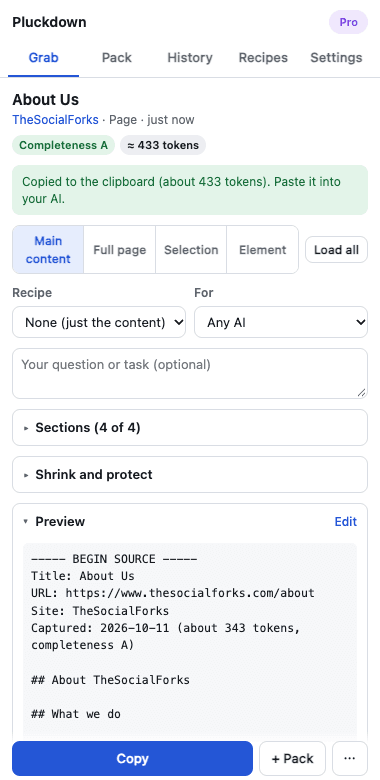
Many sources, one prompt
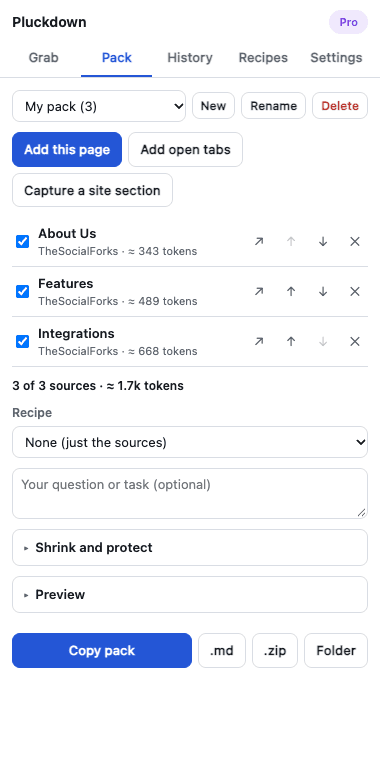
Collect pages, PDFs, transcripts and selections into a pack over minutes or days. Copy it as one prompt, or save it as files for a coding agent.
Sources that are hard to read
Video transcripts with timestamps, PDFs, discussion threads with their nesting, and pages only your own browser session can reach.
Safe to paste
Text hidden on a page is left out, pages that try to instruct your AI are flagged, and Pro replaces emails, phone numbers and keys before anything is copied.
What do you want to do?
- Copy any web page as clean Markdown for AIFree
- YouTube transcript to ChatGPT, Claude or GeminiFree
- PDF to Claude, ChatGPT or Gemini as clean textFree
- Reddit and Hacker News threads to MarkdownFree
- Context packs for Cursor, Claude Code and other coding agentsPro
- Redact personal data and secrets before pasting into AIPro
Pro, for work that needs more than one page
- Unlimited context packs, with text repeated across sources kept once
- Add many open tabs at once, or capture a whole section of a docs site
- Fit to a token budget or split into parts; summarise on your own device where Chrome’s built-in AI is available
- Redaction with your own patterns, and restore in the answer
- GitHub threads, Google Docs, Sheets and Slides
- Jira, Confluence and your own site adapters
- Insert into the ChatGPT, Claude or Gemini tab (beta)
- Screenshots of the visible area, the full page or a region
- Folder, .zip and Obsidian export; site rules; per-AI formatting; command palette
Pricing
Every install starts with 7 days of Pro, no card needed. 14-day refund on every purchase. Prices are in US dollars, and in rupees for buyers in India. The checkout page says whether a plan renews by itself before you pay.
Questions
- Where does my data go?
- Nowhere. Captures are kept in your browser on your device and are never sent to TheSocialForks. The only server Pluckdown talks to checks license keys. The extension reads a page only when you ask it to.
- Does it use my AI subscription or an API key?
- No. It prepares the text; you paste it into whichever AI you already use.
- What can it not read?
- Browser pages such as chrome:// and the Chrome Web Store, content inside frames from another site, and text drawn on a canvas. When something is missing, the completeness grade says so.
- How do I cancel, or get a refund?
- Cancel a subscription yourself on the manage page. For a refund, write to support@thesocialforks.com within 14 days of buying. See cancellation and refunds.
- Which browsers?
- Google Chrome 128 or later.
Pluckdown is made by TheSocialForks. Not affiliated with OpenAI, Anthropic or Google. Support: support@thesocialforks.com.